

A classifieds site gets slow in a predictable way. Traffic grows, and every visitor makes PHP and the database do the same work again. Most of those visitors are not logged in and read the same pages as everyone else.
So the biggest win is to stop building those pages for every request. nginx can keep a finished copy of a page and hand it out without running PHP at all. This post shows how we set that up for ShopClass, and how the free nginx Cache plugin lets nginx keep pages for an hour while still showing an edit on the next page load.
We built this for our own site first. TuffClassified is a classifieds site in India that runs on ShopClass, with about 245,000 listings and 170,000 users. Search engine crawlers walk through those listing pages much faster than people do, and almost never ask for the same page twice. Every one of those requests built a page in PHP. On a busy day all the PHP workers were taken at once, and visitors got 502 errors.
A 30-second cache did not help much, because a crawler is long gone before the same page is asked for again. We needed pages to stay cached for an hour, and still change the moment a seller edits a listing. That is what this plugin does, and it now runs on TuffClassified.
What a page cache changed in our tests
We load-tested ShopClass 6.4.0 with 10 users at once for 30 seconds per page. First with plain PHP, then with memcached, then with nginx’s FastCGI cache in front. Requests per second:
| Setup | Home | Listing | Search |
|---|---|---|---|
| Plain PHP | 541 | 377 | 474 |
| With memcached | 555 | 408 | 501 |
| With the nginx page cache | 7,584 | 6,292 | 6,492 |
Server response with the page cache was 0.5 ms.
memcached helps a little, because PHP still runs on every request. The page cache skips PHP, so the jump is more than ten times. The test ran in Docker containers with 50 listings: PHP 8.4 with OPcache, limited to 2 CPU cores and 1 GB of memory, with nginx and MariaDB beside it. Your hosting, theme and plugins will change the numbers. The full method is on our comparison page.
ShopClass tells nginx what it may keep
A page cache is only safe if it never hands one visitor’s page to another. Your server cannot tell a public listing from a private dashboard by looking at the URL, so ShopClass says it in a header. A public page gets:
Cache-Control: public, s-maxage=30, max-age=0, must-revalidateA personal page, such as a dashboard or a page that starts a session, gets
private, no-store, and nginx never stores it.
nginx also skips the cache for any request that carries one of ShopClass’s own cookies. This is the map from the plugin’s nginx config:
map $http_cookie $mc_private { default 0; "~(^|;\s*)(oc_cache_bypass|oc_userLocale|osclass|PHPSESSID)=" 1;}These mean a logged-in visitor, a chosen language, or an active session. Other cookies, like analytics, are ignored on purpose. Otherwise one analytics cookie would make every real visitor a miss.
The caching contract has the full rules.
Turn the cache on
In the ShopClass Docker image, set one environment variable:
environment: OSC_MICROCACHE: "1"The container writes the nginx settings when it starts, so they survive a redeploy.
On your own nginx, add the cache zone and the cookie map above in http{}:
fastcgi_cache_path /var/cache/nginx/microcache levels=1:2 keys_zone=MICROCACHE:10m max_size=500m inactive=1d use_temp_path=off;Then add these lines inside your existing location ~ \.php$:
fastcgi_cache MICROCACHE;fastcgi_cache_key "$scheme$request_method$host$request_uri";fastcgi_cache_bypass $mc_private;fastcgi_no_cache $mc_private;fastcgi_cache_lock on;fastcgi_cache_use_stale updating error timeout http_500 http_503;fastcgi_cache_background_update on;add_header X-Cache $upstream_cache_status always;Do not add fastcgi_ignore_headers or fastcgi_cache_valid. Both make nginx
decide on its own what to cache, and it cannot tell public pages from private
ones. The page cache docs cover both setups.
Why thirty seconds, and what the plugin changes
Out of the box, nginx keeps a page for 30 seconds. That is short on purpose. Without a way to remove a page early, a longer time means an edited listing shows its old price until the time runs out.
Visitors already get fast pages at 30 seconds, because nginx serves the old copy while it builds a new one in the background. So the plugin does not make pages load faster. It saves work on your server: each page is built once an hour instead of once every 30 seconds. On a site with thousands of listings, that is a lot less PHP.
To keep pages for an hour safely, something has to remove a page the moment it changes. That is what the plugin does.
Set up the plugin
Install it from Plugins → Manage plugins → Browse, or from the command line:
php oc-cli.php market:install nginx-cacheIt needs ShopClass 6.2.0 or later, and nginx built with the ngx_cache_purge
module. The ShopClass Docker image already has the module and the purge address,
whenever OSC_MICROCACHE is on. Elsewhere, install it as a package:
libnginx-mod-http-cache-purge on Debian, nginx-mod-http-cache-purge on
Alpine.
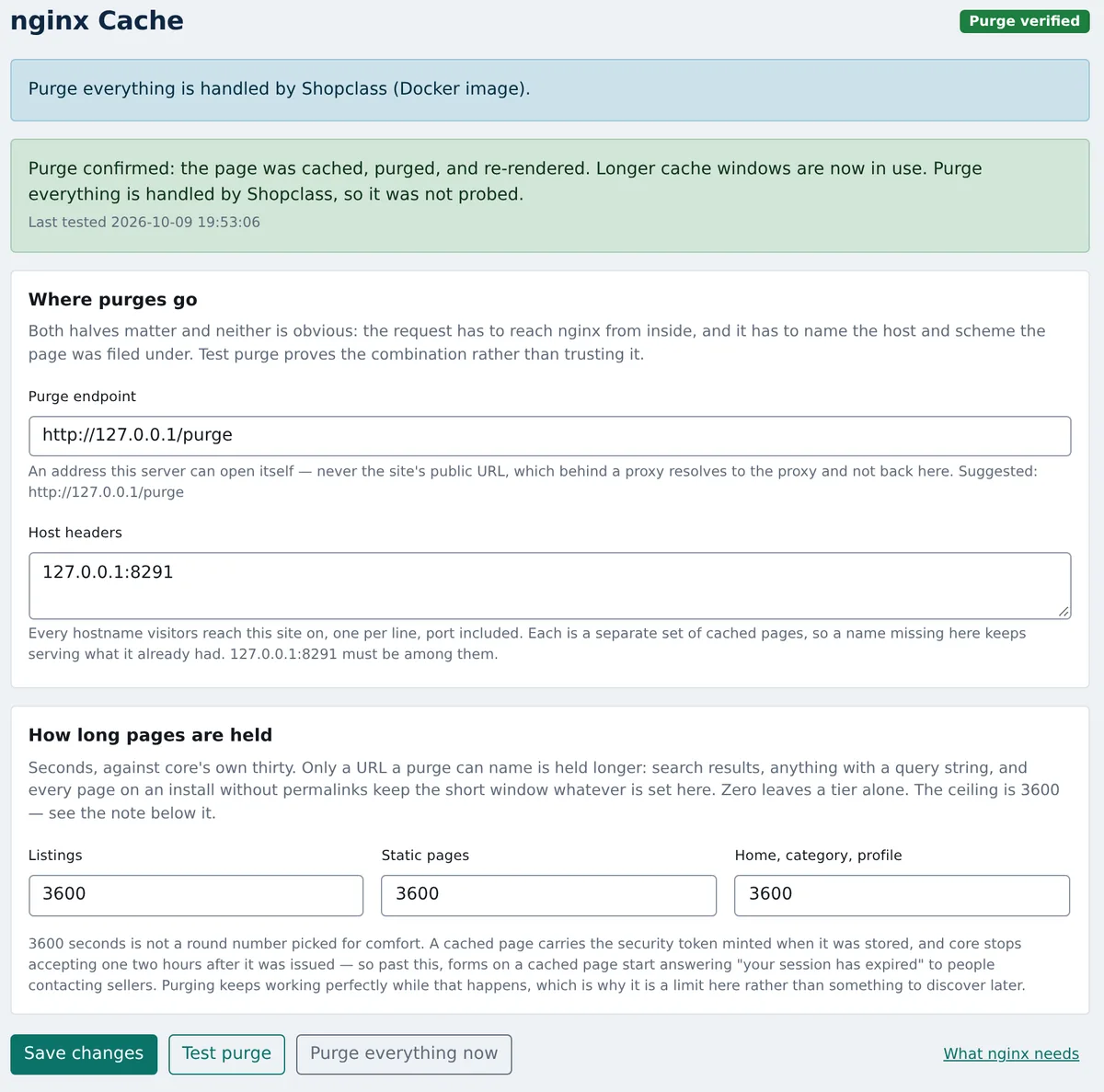
The plugin adds two pages under Plugins. nginx Cache: Setup prints the nginx settings for your install, with your host, scheme and nginx version filled in. The purge address in the plugin’s nginx config looks like this:
location ~ ^/purge(/.*)$ { allow 127.0.0.1; allow 172.16.0.0/12; deny all; fastcgi_cache_purge MICROCACHE "$scheme$request_method$host$1$is_args$args";}A purge takes no password, so the allow list is the only thing guarding it. Keep it closed to the outside world.
The settings page, nginx Cache, has two fields:
- Purge endpoint: an address this server can reach itself, such as
http://127.0.0.1/purge. Never your public URL. Behind a proxy, that leads to the proxy and not back to your server. - Host headers: every hostname your site answers on, one per line. nginx
keeps a separate copy of each page for each name, so list
www.example.comandexample.comif you use both.
Below them are three times in seconds: Listings, Static pages and Home, category, profile. Each defaults to 3600.
Press Test purge. It stores the home page on each hostname, purges it, and checks it is gone. Until that passes, pages stay at 30 seconds. A long cache with a purge that quietly fails would be worse than no plugin. Changing either field closes the gate again.
How purging works
When a listing is posted, edited, deleted, enabled, disabled, made premium or has its expiry changed, the plugin purges the pages that show it:
- the listing itself, plus one copy per language
- the home page
- the listing’s category page
- the seller’s public profile
It also purges when a category is added or deleted, when a static page is edited or deleted, and when a storage plugin moves a listing’s images elsewhere.
The purge is sent in the same request that made the change. So the edit shows on the next page load, not at the next cron run. If nginx cannot be reached, the purge waits in a queue and is retried on every cron run. The settings page shows these under Purges waiting, with a Retry now button. Those pages are out of date until the retry works.
Some changes show on every page: a new theme, saved settings, a plugin turned on or off, maintenance mode, or a language, currency or widget change. From version 0.5.0 the plugin clears the whole cache for these. ShopClass 6.4.2 and later tells the plugin when one happens. On older versions it clears everything on a theme switch, a plugin change or any settings save. There is also a Purge everything now button on the settings page.
Clearing everything takes one more line inside location ~ \.php$. The Setup
page prints it:
fastcgi_cache_purge PURGE purge_all from 127.0.0.1;It only lets in 127.0.0.1. If PHP runs in another container, add that
container’s address. The ShopClass Docker image has the line from 6.4.2 on.
If nginx refuses the full purge, the plugin purges the pages it can name (home, categories, static pages, the sitemap) and tries again on the next cron run. Test purge checks this too, and the settings page warns you until it passes.
What is never held longer
The plugin only keeps a page longer if it can name that page’s address, because that is what a purge needs. These stay at 30 seconds whatever the settings say:
- Search results with options. Every keyword, filter, sort and page number is its own copy. Nobody can list them all, and a new listing has to show up in them.
- Any address with a query string, such as
?comments-page=2or?utm_source=…. - Every page, if permalinks are off. Turn them on under Settings → Permalinks first.
Logged-in visitors and anyone with a ShopClass session never get a cached page,
and pages sent as private, no-store are never stored.
Why an hour is the limit
Each form on a page carries a security token, and a cached page keeps the token from when it was stored. ShopClass stops accepting a token two hours after it was made. Cache a page much longer than an hour and forms like contact seller start saying your session has expired, while purging still looks fine. So the plugin refuses values above 3600.
Check that it works
Ask for a page twice and read the X-Cache header:
curl -sI https://example.com/ | grep -i x-cachecurl -sI https://example.com/ | grep -i x-cacheMISS, thenHIT: the cache works.BYPASS: the request had a login or language cookie. That is correct.- No header at all: the cache is not set up yet.
Then edit a listing in the admin and request its page again. The first answer
should be MISS, because the old copy was purged.
Limits
- It needs nginx. On Apache, there is no FastCGI cache to purge. The cache
itself needs a
fastcgi_cache_path, and the purge needs thengx_cache_purgemodule loaded. - Most shared hosting is out. If you cannot edit nginx settings or load a module, you cannot use it. The Docker image is the easiest route.
- The official nginx Docker image does not carry the module. The Setup page prints a short two-stage Dockerfile that builds it against stock nginx.
- Search stays at 30 seconds. That is most of the long tail on a busy site.
- A missing hostname stays stale for the hour. Test purge checks each name you list, and requires your site’s own host. It cannot know about a name you left out.
If you also use Cloudflare, our Cloudflare plugin purges the edge from the same events, and the two work side by side. For running nginx in front of ShopClass during upgrades, see zero-downtime ShopClass deploys.
The plugin is free and GPL-licensed, on GitHub. Found a problem? Open an issue there.