

While running ShopClass for a high-traffic client classifieds site, we built a deploy pipeline that upgrades the site without dropping a request. This post shows how it works, with the configuration we run, cleaned of anything site-specific.
It is for anyone running ShopClass with Docker Compose: self-hosters and agencies alike. You need nothing beyond nginx and Compose.
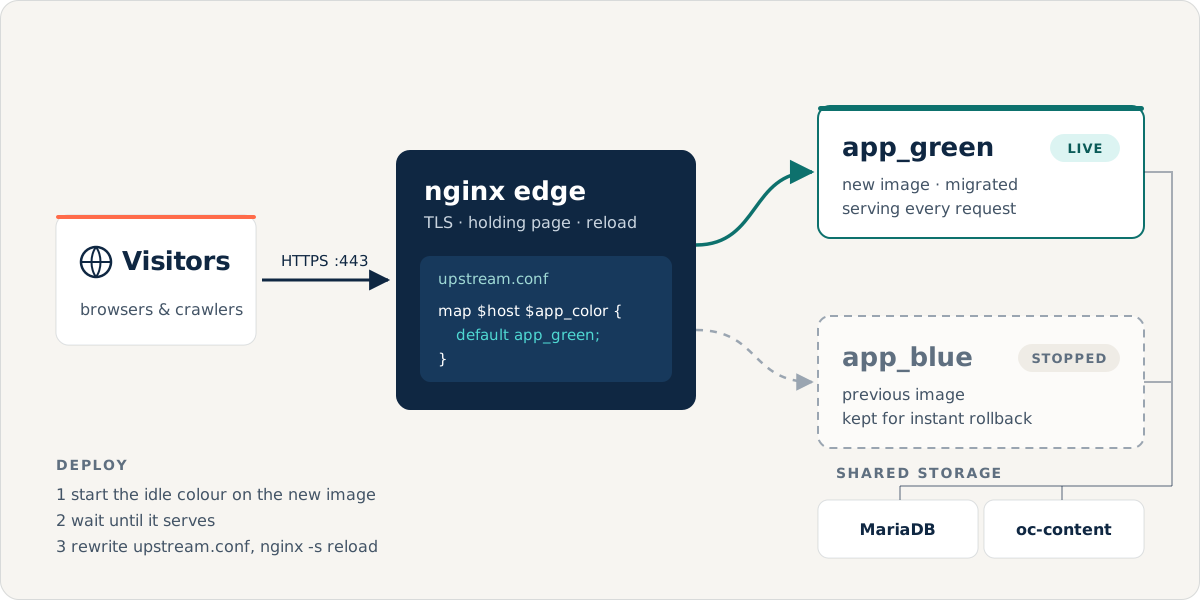
The problem: every upgrade is a short outage
The ShopClass image is one container: php-fpm, nginx and supervisor together. On start, its entrypoint waits for the database and runs any pending migrations before php-fpm starts serving.
So a normal upgrade looks like this:
docker compose pulldocker compose up -dCompose stops the old container and starts the new one. Until the new one has migrated and started serving, there is nothing behind port 443. Visitors get a 502 for a few seconds on every upgrade. If the new image is broken, the outage lasts until someone notices.
The idea: two app containers and a switch in front
- An nginx edge container terminates TLS and proxies to the app. It is the only container that publishes ports. The app image itself is unchanged.
- Two identical app containers,
app_blueandapp_green. They share the same volumes and the same database. Only one serves at a time. - A deploy starts the idle colour on the new image, waits until it really serves, points the edge at it, then stops the old colour.
If the new colour never becomes healthy, the edge is never pointed at it. The old version keeps serving, so a bad build cannot take the site down. The old colour is stopped, not removed, so rolling back is one reload.
The compose file
name: shopclass
x-app: &app  image: ghcr.io/mindstellar/shopclass:latest  restart: unless-stopped  environment:    OSC_IGNORE_CONFIG_FILE: "1"    DB_HOST: db    DB_NAME: ${DB_NAME}    DB_USER: ${DB_USER}    DB_PASSWORD: ${DB_PASSWORD}    WEB_PATH: ${WEB_PATH}                 # https://example.com/  volumes:                                 # shared by both colours    - oc-content:/application/oc-content    - uploads:/application/oc-content/uploads    - downloads:/application/oc-content/downloads  depends_on:    db: { condition: service_healthy }  networks: [web, data]  healthcheck:    test: ["CMD", "curl", "-fsS", "-o", "/dev/null", "http://127.0.0.1/"]    interval: 10s    timeout: 5s    retries: 12
services:  edge:    image: nginx:alpine    restart: unless-stopped    ports: ["443:443", "80:80"]    volumes:      - ./edge/nginx.conf:/etc/nginx/conf.d/default.conf:ro      - ./edge/active:/etc/nginx/active:ro       # a directory, on purpose      - ./edge/maintenance.html:/usr/share/nginx/html/__maintenance.html:ro      - /etc/letsencrypt:/etc/letsencrypt:ro    networks: [web]
  app_blue:    <<: *app  app_green:    <<: *app
  db:    image: mariadb:11    restart: unless-stopped    environment:      MARIADB_ROOT_PASSWORD: ${DB_ROOT_PASSWORD}      MARIADB_DATABASE: ${DB_NAME}      MARIADB_USER: ${DB_USER}      MARIADB_PASSWORD: ${DB_PASSWORD}    volumes: [db-data:/var/lib/mysql]    healthcheck:      test: ["CMD", "healthcheck.sh", "--connect", "--innodb_initialized"]      interval: 10s      timeout: 5s      retries: 20    networks: [data]
networks: { web: {}, data: {} }volumes:  { oc-content: {}, uploads: {}, downloads: {}, db-data: {} }
Add your usual cache, search and mail services next to these. They are left out here to keep the example short.
The edge
The “which colour is live” switch is a tiny file of its own:
map $host $app_color { default app_blue;}The server config includes it and proxies to whichever colour it names:
resolver 127.0.0.11 ipv6=off valid=10s;     # Docker's built-in DNSinclude /etc/nginx/active/upstream.conf;    # defines $app_color
server {    listen 80 default_server;    server_name _;    return 301 https://example.com$request_uri;}
server {    listen 443 ssl default_server;    http2 on;    server_name example.com;
    ssl_certificate     /etc/letsencrypt/live/example.com/fullchain.pem;    ssl_certificate_key /etc/letsencrypt/live/example.com/privkey.pem;
    error_page 502 503 504 =503 /__maintenance.html;    location = /__maintenance.html {        internal;        root /usr/share/nginx/html;        add_header Retry-After 10 always;        add_header Cache-Control "no-store" always;    }
    location / {        proxy_pass http://$app_color:80$request_uri;        proxy_http_version 1.1;        proxy_set_header Host              $host;        proxy_set_header X-Forwarded-Proto https;        proxy_set_header X-Forwarded-For   $proxy_add_x_forwarded_for;        proxy_read_timeout 60s;        proxy_buffer_size       16k;        proxy_buffers        8  16k;        proxy_busy_buffers_size 32k;    }}
Three parts of this config are easy to get wrong. We got each one wrong before we got it right.
Lesson 1: resolve the backend per request, not at start-up
The obvious config is a static upstream:
upstream app { server app_blue:80; }nginx resolves that name once, when it loads the config. If app_blue is not
running at that moment, nginx refuses to start. The edge goes down, and with
it the holding page that was meant to cover exactly this case.
Putting a variable in proxy_pass changes when the name is resolved. With a
resolver set, nginx looks the name up per request, through Docker’s DNS at
127.0.0.11. The edge always starts. If the live colour is down, that one
request gets a 502, which the holding page turns into a polite 503.
The $request_uri at the end passes the original path and query string through
unchanged.
Lesson 2: mount the switch as a directory, not a file
A bind mount of a single file is tied to that exact file on disk, its inode. Many tools save a file by writing a new one and renaming it over the old one. The new file has a new inode, and a single-file mount keeps showing the container the old one. Your flip silently does nothing.
A directory mount is resolved by path, so the container always sees the
current file. That is why edge/active/ is mounted as a directory, holding just
upstream.conf.
Lesson 3: a holding page for the moments that slip through
error_page 502 503 504 =503 /__maintenance.html serves a “back in a moment”
page whenever the app cannot be reached: a crash, or the one-time cutover
described below. It answers with 503 and Retry-After, so search engines
treat the page as temporary and do not drop your listings from their index.
The deploy script
#!/usr/bin/env bashset -euo pipefailC="docker compose -f docker-compose.yml"
$C pull                                             # 1. the new image
if docker ps --format '{{.Names}}' | grep -qx 'shopclass-app_green-1'; then  active=green; idle=blueelse  active=blue;  idle=green                          # also the first runfiecho "active=$active  deploying onto idle=$idle"
$C up -d --no-deps "app_$idle"                      # 2. start the idle colour
ready=                                              # 3. wait until it servesfor i in $(seq 1 60); do  code=$($C exec -T "app_$idle" curl -s -o /dev/null -w '%{http_code}' \         -H 'Host: example.com' -H 'X-Forwarded-Proto: https' http://127.0.0.1/ || true)  case "$code" in 200|301|302) ready=1; break;; esac  sleep 5done[ "$ready" = 1 ] || { echo "idle never came up; NOT flipping ($active still serving)"; exit 1; }
# 4. flip: rewrite the switch, then a graceful reloadprintf 'map $host $app_color {\n    default app_%s;\n}\n' "$idle" > edge/active/upstream.conf$C exec -T edge nginx -t$C exec -T edge nginx -s reload
# 5. check through the edge, over TLS, with the real hostname$C exec -T "app_$idle" curl -fsS -o /dev/null \   --connect-to example.com:443:edge:443 https://example.com/
# 6. stop the old colour; keep it for rollback[ "$active" != "$idle" ] && $C stop "app_$active" || trueecho "now serving $idle"
Step 3 is the real safety gate. ShopClass only starts serving once its migrations have finished, so “the idle colour answers on its own nginx” means “the idle colour is migrated and ready”. Until then, the old colour serves everyone.
Step 4 is nginx -s reload, not a restart. nginx starts new workers on the new
config and lets the old workers finish their open requests. Nothing on port 443
is dropped.
Rolling back
The previous colour is only stopped, so rolling back takes seconds. Start it and
point the switch back. Use whichever colour was live before (app_blue here):
docker compose up -d app_blueprintf 'map $host $app_color {\n default app_blue;\n}\n' > edge/active/upstream.confdocker compose exec -T edge nginx -s reloadRunning commands in the live colour
Anything that used to run docker compose exec -T app … breaks once “app” is
two containers. That covers cron, backups, background workers and theme
deploys. A small wrapper finds the running colour and runs the command there:
#!/usr/bin/env bash# app-exec.sh: run a command in whichever colour is liveset -euo pipefailC="docker compose -f /srv/shopclass/docker-compose.yml"for color in blue green; do if docker ps --format '{{.Names}}' | grep -qx "shopclass-app_${color}-1"; then exec $C exec -T "app_${color}" "$@" fidoneecho "app-exec: no running app colour" >&2; exit 1Because it uses exec, input and output pass straight through, so pipes work:
# cron*/5 * * * * /srv/shopclass/app-exec.sh php /application/oc-cli.php cron --type=hourly
# backup of oc-content/srv/shopclass/app-exec.sh tar -C /application/oc-content -cf - . | gzip > backup.tgz
The one caveat: migrations
For a few seconds during a deploy, both colours run against the same database. The new colour has already migrated it, so the old colour’s code briefly runs on the new schema.
That is safe for additive migrations: a new table, a new column, a new index. Most releases only make changes like these. A migration that drops or renames a column the old code still reads is not safe. Treat those with the usual expand-and-contract pattern: add the new shape in one release, and remove the old one in a later release.
Moving an existing site over
The first switch to this layout recreates the edge container once, to add its new mounts. That takes a second or two, and the holding page covers it. Every deploy after that is a reload only, with no restart.
Did it work?
We tested it on the live site. A plain loop sent about four requests a second over TLS to the edge while a deploy flipped colours:
for i in $(seq 1 600); do  curl -s -o /dev/null -w '%{http_code}\n' \    --resolve example.com:443:127.0.0.1 https://example.com/  sleep 0.25done | tee probe.log
sort probe.log | uniq -c
The 600 is only an upper limit. We let the loop run for about 80 seconds,
across one colour flip, then stopped it with Ctrl+C. All 323 requests it had
sent came back 200. Not one failed.
What you get:
- Upgrades with no downtime. A deploy is a reload, not a restart.
- A broken build cannot take the site down. It never receives traffic.
- Rollback in seconds. The previous version is still there, only stopped.
For the image itself, with its volumes, environment variables and how updates work, see Docker & the production image. For TLS, permissions and the real client IP behind a proxy, see Security & hardening.