

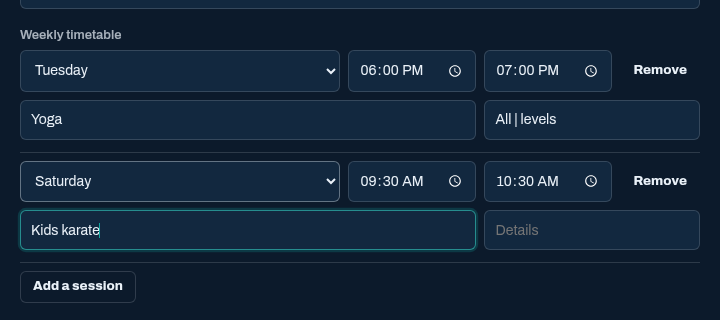
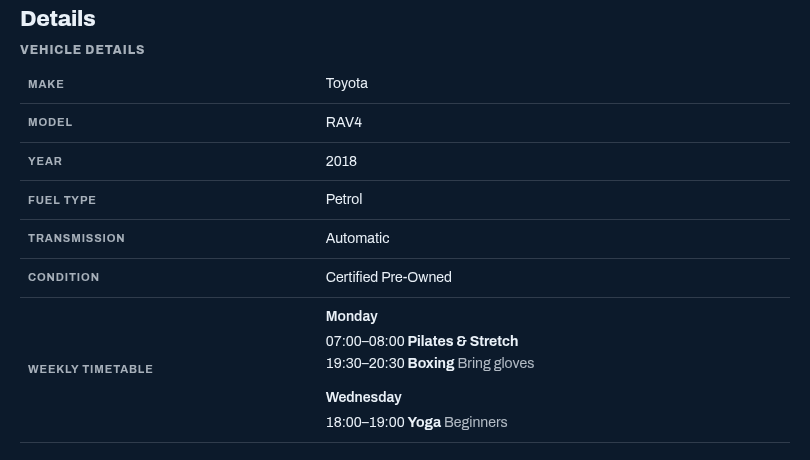
Lets posters add a weekly timetable of classes or sessions to a listing: a gym's classes, a school's lessons, a club's training nights. The listing page shows it by day.
The timetable is saved in a normal Text area custom field, so it needs no new table and stays with the listing if the plugin is turned off.
Requirements
- ShopClass 7.0.0 or later
- PHP 8.0 or later
Install
- Open Plugins → Browse (or upload the zip from the GitHub release).
- Install.
- Activate.
Set up
- Open Forms → Manage forms and open the form for the categories that need a timetable.
- Use Add field to add a Text area field, for example "Weekly timetable".
- Open Plugins → Weekly Timetable, pick that field under Timetable field, and save. Where it shows then lists the categories the field's form is set for.
The settings page also has a short How to use it section.
How it works
- On the publish and edit forms, the Text area becomes rows. Each row has a day, a start time, an end time, a class and details. Add a session adds a row.
- Each row is saved as one line of the Text area, for example
Mon | 18:00 | 19:00 | Yoga | Beginners. - The listing page shows the sessions under each day, sorted by start time.
- The admin's listing editor shows the plain lines. They can be edited there in the same format.
- Uninstall removes the plugin's one setting. The field and its values stay.
Theme notes
The plugin sets layout only. Inputs and buttons use the theme's own styles. The listing view uses these classes: timetable, timetable__day, timetable__name, timetable__time, timetable__note.
Translate
The template is languages/timetable.pot. Put a translation in languages/<locale>/messages.po and messages.mo, for example languages/de_DE/messages.mo.
What's new in 0.1.0
New
- Posters fill in a weekly timetable on the listing form: a row per session with a day, start, end, class and details.
- The listing page shows the timetable by day, sorted by start time.
- The timetable is saved in a Text area custom field picked under Plugins → Weekly Timetable. The settings page shows the categories where it appears, and how to use it.
- Translation template in
languages/timetable.pot.
Found a problem with Weekly Timetable? Open an issue on GitHub.


