

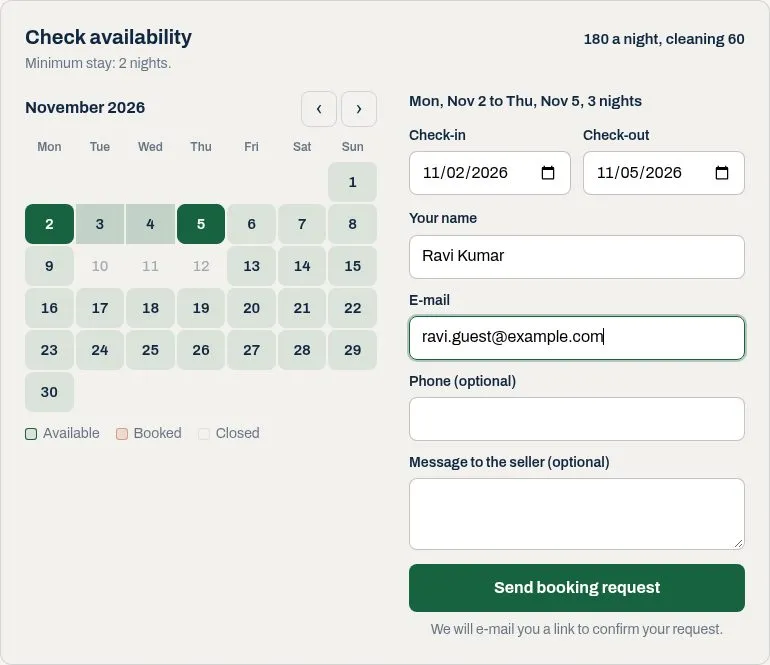
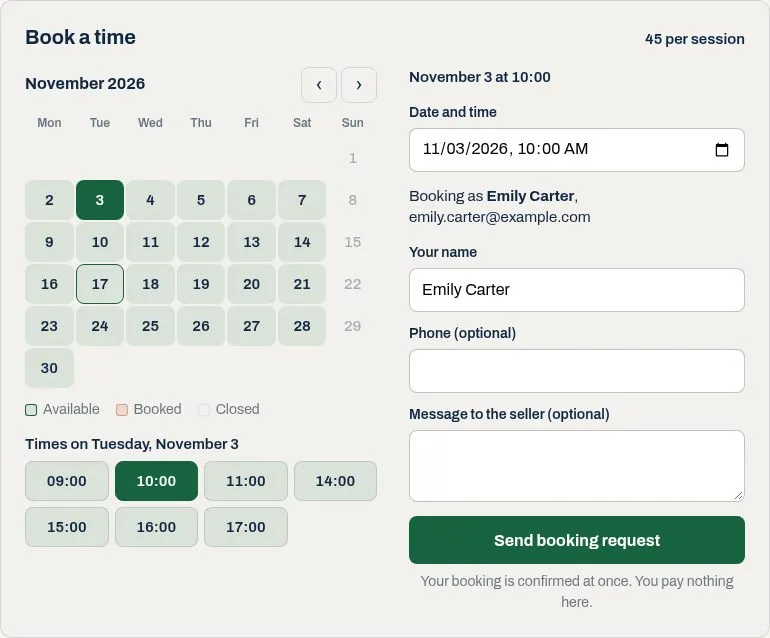
Let buyers book a ShopClass listing for dates or a time slot: holiday rentals, rooms, equipment, appointments and other services. Buyers see what is free on the listing page, send a request, and both sides get e-mails as it is accepted, declined or cancelled.
Requirements
- ShopClass 7.0 or later
- PHP 8.0 or later
- Nothing else: it works on plain shared hosting.
E-mails and the expiry of old requests run on core's job queue, so a request never waits on the mail server. With only core's auto-cron, e-mails go out within minutes as visitors load pages. With a real cron line or the job worker (php oc-cli.php jobs:work), they go out at once.
Setup
- Install and activate the plugin, then open Plugins → Booking Calendar.
- Pick a mode for each category that takes bookings:
- Nights: buyers pick a check-in and a check-out date.
- Time slots: buyers pick one fixed-length time inside the seller's weekly hours.
A subcategory follows its parent unless you set it.
- Sellers open My account → Bookings, choose a listing and tick Take bookings for this listing. There they set the minimum stay or the slot length and weekly hours, a price note, closed dates, and whether requests are confirmed at once.
Listings in other categories show nothing, and pages without a calendar load nothing.
How a booking goes
- A signed-in buyer's request is stored at once as waiting for reply, or confirmed when the seller chose auto-confirm.
- A guest gets an e-mail with a link. The request is kept on the server and the link carries only a random id; the booking is made when they open it and press the button, so the seller never sees unconfirmed addresses. Guests are limited per IP address per hour (per /64 network for IPv6), and can be switched off.
- A signed-in buyer always books with their account's e-mail address. Accounts are limited per hour (site and API together), and in how many requests they may have waiting, per listing and in all.
- The seller accepts or declines from their account. Either side can cancel; the buyer's e-mails carry a cancel link.
- Requests nobody answers expire after the hours set in the settings, checked hourly by cron.
- Two requests for the same time cannot both succeed: the overlap check runs inside a transaction that locks the listing, and the database refuses two live bookings that start at the same moment.
Times are stored in UTC and shown in the site's time zone. Slots follow the clock on the wall, so a day with a clock change has one slot more or less.
Deactivate or uninstall
Deactivating the plugin hides the calendars and keeps every booking. Uninstalling deletes all bookings, closed dates, listing settings and the plugin's settings, and cannot be undone.
Calendar feed
Each listing's settings show a private .ics address. Add it to Google, Apple or Outlook calendar to see the bookings there. Events are named by booking number and status; no buyer details are in the feed. Ticking Make a new address stops the old one.
Import other calendars
A seller can paste up to 3 calendar addresses (.ics) from Airbnb, Booking.com, Google Calendar and so on in a listing's settings. Every hour cron reads them and closes the busy dates here; with the calendar feed above, the two sites stay in step both ways.
- A busy all-day event closes its nights; the check-out day stays free. A timed event closes each day it touches. Cancelled and free events are skipped. A repeating event counts only its first time.
- Imported dates are kept apart from the seller's own: the seller's box shows only theirs, and saving it leaves imported ones alone. Clearing the addresses opens the imported dates.
- When a calendar cannot be read, the dates imported before stay, and the seller sees why.
- Only
https://(orwebcal://) addresses on the public internet are read: never this site, a private network or a plain-HTTP server. The connection goes to the address that was checked (on ShopClass versions whose HTTP client can pin it). Files over 2 MB are refused. - Addresses can carry a secret, so they are shown only to the seller and never logged.
- Listings are read 10 at a time, oldest first, and a run stops starting new ones after 15 seconds; the rest follow in the next run. A calendar file is read only up to its first 2000 events. A seller who changes the addresses gets a read within minutes.
It is off until the admin ticks Let sellers import other calendars under Defaults and limits, so an update never starts reading other sites on its own. Off, the box is hidden, nothing is read, and imported dates are ignored; they count again when it is switched back on.
Personal data
A member's data export lists the booking requests they sent, from their account or as a guest with its address. When the account is deleted, those bookings lose the buyer's name, address, phone and message, and any still holding dates are cancelled. A deleted listing takes its bookings with it.
Admin
Plugins → Bookings lists every booking, filtered by status.
For theme authors
The listing page calendar is printed on the item_detail hook, which the bundled themes fire. Its markup uses classes starting with booking- (.booking, .booking-day, .booking-day--free, .booking-slot, .booking-form and so on). The account pages use core's oe-* classes.
Colours come from custom properties on .booking. Set them in the theme's CSS:
| Property | What it colours |
|---|---|
--booking-pick | Chosen days and slots, the submit button, focus rings |
--booking-pick-text | Text on --booking-pick |
--booking-free | Free days and slots |
--booking-booked | Booked days |
--booking-muted | Hover on the month arrows |
--booking-line | Borders |
--booking-soft | Hints, legend, closed days |
--booking-ok | The success message |
--booking-error | The error message |
--booking-radius | Corner radius of the card |
Most of them are mixed from --booking-pick and the text colour, so often one is enough:
.booking { --booking-pick: #b45309; }Most rules are written as .booking .booking-x, so a theme rule needs the same two classes to win. Button text colours use !important, because some themes force the button colour that way; a theme that changes them needs !important too.
To replace the stylesheet, remove it after the plugin adds it on show_item:
osc_add_hook('show_item', function () { osc_remove_style('booking-calendar'); }, 10);REST API
With the API on, two endpoints are added:
GET /api/v1/ext/booking/listings/{id}/availability?from=YYYY-MM-DD: one month of the calendar. It needs an API key, but any key or token will do, including a public (read-only) key.POST /api/v1/ext/booking/listings/{id}/requests: a booking request for the signed-in user, withstart(a date for nights,YYYY-MM-DDTHH:MMlocal time for a slot),end(check-out date, nights only), and optionalname,phone,note. The account's own e-mail address is used. Needs theext:booking:writescope.
Translations
Copy languages/booking.pot to languages/<locale>/messages.po, translate it, and compile it to messages.mo in the same folder. After changing strings, run php tools/make-pot.php.
What's new in 0.2.0
Changed
- Settings use short labels with one line of help each.
- The Bookings status tabs scroll on a phone, using core's tab strip.
Found a problem with Booking Calendar? Open an issue on GitHub.


