

Lets a seller attach downloadable files to a listing (a manual, an ebook, a sample pack) and hands them to buyers through a link that decides who may have them.
Install
From the admin: Plugins → Manage plugins → Browse, find Digital Goods, then Install. Or: php oc-cli.php market:install digital-goods.
How files are kept
Uploads are stored under a random key. Nothing about where a file is kept comes from the person who uploaded it, and the download address is a separate random token.
| Storage | Where files go | Delivery |
|---|---|---|
| Local (default) | oc-content/downloads/digital-goods/, closed to the web | the download link streams the file |
| S3 with signed URLs | the bucket | the download link redirects to a signed URL that lasts 5 minutes |
| S3, public bucket | the bucket | the download link streams the file |
Every download goes through the download link, which applies the access rule and counts the fetch. A public bucket serves any file to whoever has its address; the link never shows that address, but turn on signed URLs for files that are genuinely private. The settings screen warns when a public bucket is in use.
Closing the folder on nginx
On Apache the plugin writes an .htaccess that denies the folder. nginx ignores .htaccess; add this to your server block (ShopClass's own Docker images already have it):
location ^~ /oc-content/downloads/ {
    deny all;
}
To keep the files out of the web root entirely, set a folder in config.php:
define('DG_PRIVATE_PATH', '/var/lib/shopclass-files');Set it before files are uploaded, or move the digital-goods folder there when you set it.
Upgrading from 2.0.x
2.0.x kept local files in oc-content/uploads/digital-goods/, which the web server serves. On the first request after the upgrade the plugin moves them to the new folder and closes the old one with an .htaccess. Download links do not change. A file that cannot be moved is still served through the download link, and the move is retried on the next request. On nginx you can also deny the old folder:
location ^~ /oc-content/uploads/digital-goods/ {
    deny all;
}
Faster downloads (optional)
PHP streams files in chunks and answers byte ranges, so large files do not use memory. To let the web server send the file instead, set one of these in config.php.
nginx:
location ^~ /dg-private/ {
    internal;
    alias /path/to/site/oc-content/downloads/digital-goods/;
}
define('DG_ACCEL_REDIRECT', '/dg-private/');Apache with mod_xsendfile (XSendFilePath set to the folder):
define('DG_XSENDFILE', true);Who can download
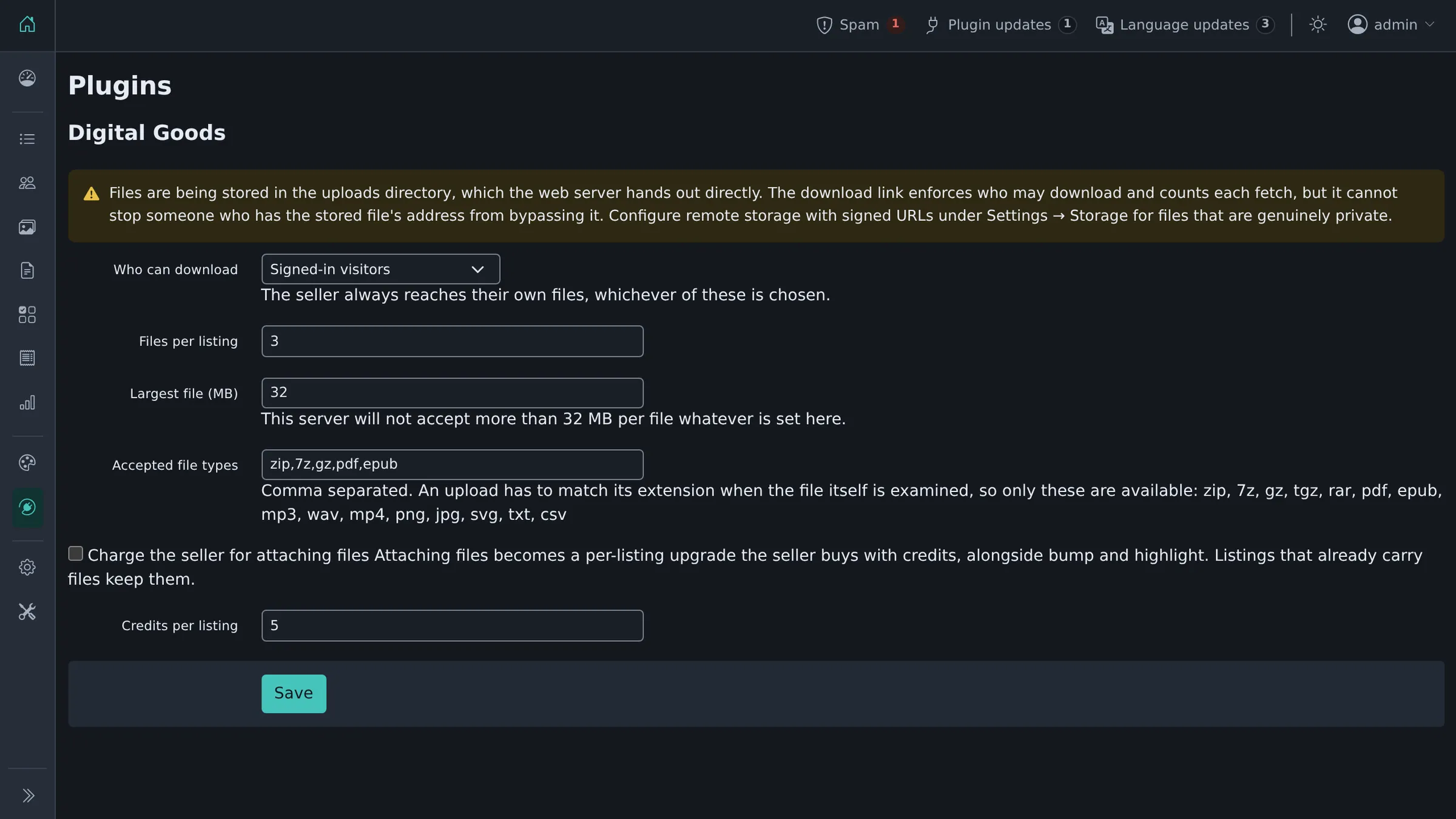
One setting, under Plugins → Digital Goods → Settings:
- Signed-in visitors (default)
- Anyone
- The seller only
The seller always reaches their own files, whichever is chosen.
Plugins → Digital Goods → Downloads lists every attached file, its listing, and how many times it was downloaded.
What may be uploaded
The admin lists the accepted extensions. An upload has to match its claimed extension when the file itself is examined, so only types the plugin can verify are offered: zip, 7z, gz, tgz, rar, pdf, epub, mp3, wav, mp4, png, jpg, svg, txt, csv. Anything else typed into that field is dropped when the settings are saved.
Per-listing file count and per-file size are settings too; the size is additionally capped by what PHP will accept, since a limit above upload_max_filesize is a promise the server will not keep.
Charging for it
Where the site has ShopClass's billing subsystem (6.2.0 and later), attaching files can be made a paid per-listing upgrade: the seller spends credits on it the same way they buy a bump or a highlight, and it appears alongside those wherever core lists what credits buy.
It is off by default. Turning a plugin on should not start charging for something that was free a moment before. Switch it on under Plugins → Digital Goods → Settings and set the price in credits. Listings that already carry files keep them.
Only the seller pays, to attach files. There is no buyer-side purchase.
Where it applies
Only in the categories you pick, at the top of Plugins → Digital Goods → Settings. Files appear on the post and edit forms and on the listing itself.
Requirements
ShopClass 6.4.0 or newer (tested up to 7.0), PHP 8.0 or newer, and the fileinfo extension (bundled with PHP and enabled by default) for checking what an upload actually is.
History
Rewritten from the Osclass "Digital Goods" plugin (1.1.0, 2013). See CHANGELOG.md for what changed.
What's new in 2.2.0
Changed
- The settings page uses core's settings form, with the standard Save bar.
- The Downloads page uses core's table, page title and empty state.
- Menu entries read Settings and Downloads under the Digital Goods heading.
- Shorter help text on every setting.
- Needs ShopClass 6.4.0 or newer.
Found a problem with Digital Goods? Open an issue on GitHub.


