

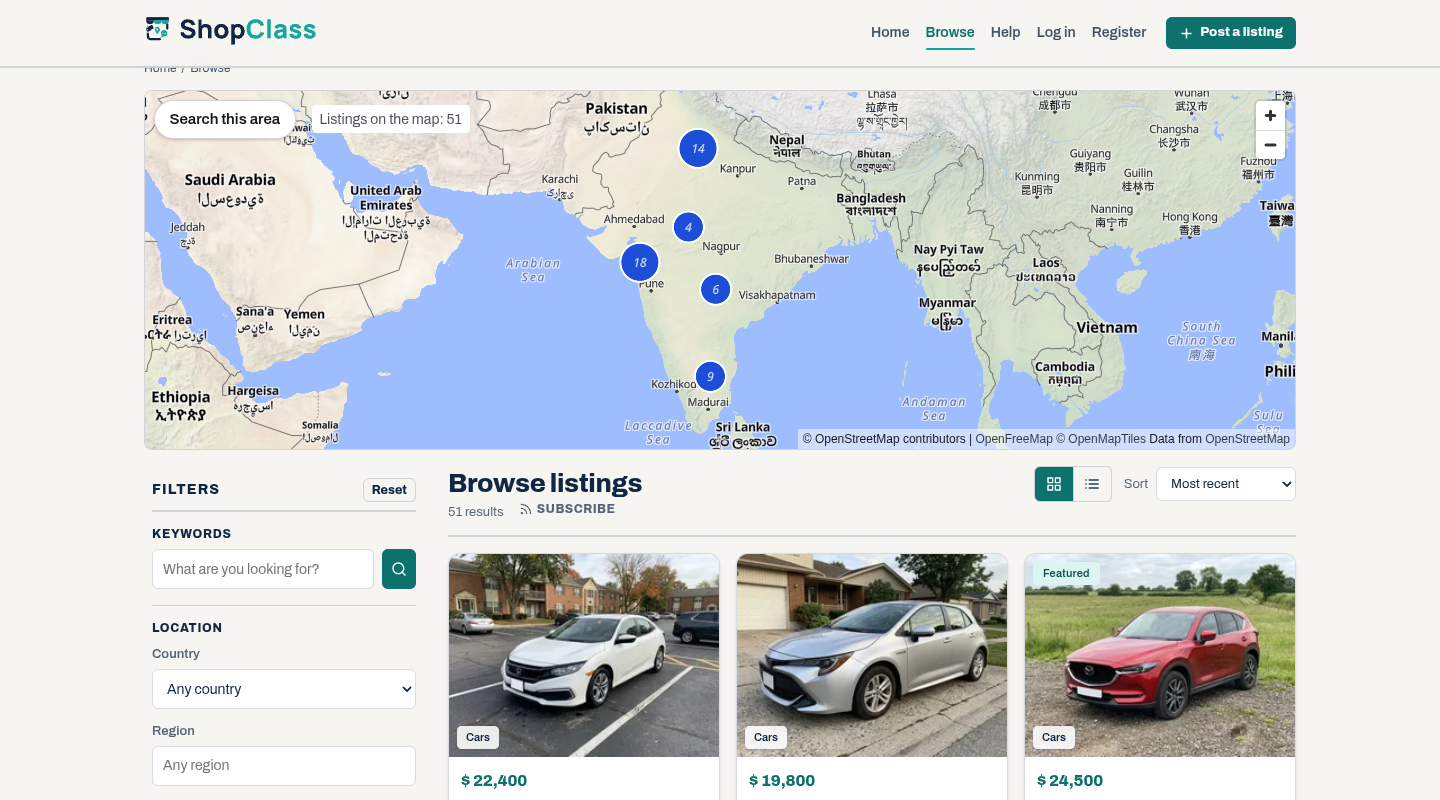
Adds a map of listings to the search page. Pins group into clusters, a pin opens a card with the photo, title, price and a link, and Search this area shows the listings in the part of the map on screen.
Requirements
- ShopClass 7.1.0 or later
- PHP 8.2 or later
- Distance search switched on (Settings → General)
- Listings with a map position. A listing gets one from its city or region, or from its address when an address lookup plugin is set up.
Install
- Open Plugins → Browse (or upload the zip from the GitHub release).
- Install.
- Activate.
Set up
Open Settings → General → Map Search. The Status line says whether the map shows, and why not.
| Setting | Default | What it does |
|---|---|---|
| Map style address | https://tiles.openfreemap.org/styles/liberty | The MapLibre style JSON, over https. OpenFreeMap needs no key. |
| Dark map style address | https://tiles.openfreemap.org/styles/dark | Used when the page is dark. Empty uses the style above. |
| Provider key | none | For a provider that needs a key. Put {key} in the style address where it goes. |
| Default centre latitude, longitude | empty | Empty: the map zooms to fit the listings. Set both to open on a fixed place instead. |
| Default zoom | 2 | 0 is the world, 18 a street. |
| Pins per map view | 200 | The most listings loaded at once, 50 to 500. |
| Show the map above the search results | on | Draws the map on the search page in themes that have a place for it. |
A keyed provider, for example MapTiler: https://api.maptiler.com/maps/streets-v2/style.json?key={key}. The key is sent to every visitor's browser, so limit it to your site's address in the provider's dashboard.
How it works
- The map loads its pins from the plugin's own address,
map-search/pins, after each move. The REST API is not used: it gives only exact positions (listings placed by their city have none), and its guest answers cannot be cached. - The pins come from core's search, with the search page's filters and the map's box. They hold only what the listing page shows: title, price, photo, link and map position. A listing placed by its city or region says "Approximate location".
- Answers are cached for a minute and limited to 120 requests a minute per visitor address.
- Search this area opens the search page for the box on screen, with the other filters kept.
- The map credit "© OpenStreetMap contributors" always shows, with the tile provider's credit.
- The map follows the page's light or dark mode:
data-themeordata-bs-themeon<html>, else the device setting. - With no JavaScript or WebGL, a link to the list of results shows instead. Screen readers hear the number of listings on the map.
For themes
Themes place the map; the plugin draws it. The map shows on the search_ads_listing_top hook on the search page. A theme without that hook, or one that wants the map somewhere else, calls:
<?php if (function_exists('map_search_render')) { map_search_render(); } ?>Options: class (extra class names), center (array(lat, lng)), zoom, search_button (false hides Search this area). The map is drawn once per page. A theme that places it itself turns the hook off:
osc_add_filter('map_search_auto_place', static fn () => false);A pin click fires a cancelable map-search:pin event on the map (detail: id, url, title); call preventDefault() to open the listing your own way instead of the card.
Style it with CSS variables on .map-search: --map-search-height, --map-search-radius, --map-search-pin, --map-search-cluster, --map-search-cluster-text, --map-search-ring, --map-search-button-bg, --map-search-button-fg, --map-search-focus and others in assets/map-search.css. The pin and cluster colours are read from --map-search-pin, --map-search-cluster, --map-search-cluster-text and --map-search-ring on the map, and again when the page switches between light and dark, so light-dark() values work.
Notes
- Nothing shows while distance search is off or while no listing has a map position.
- The scripts load only on pages that draw the map. MapLibre GL JS 5.24.0 ships with the plugin (BSD-3-Clause,
assets/maplibre/LICENSE.txt); no CDN is used. - The OpenStreetMap tile servers (
tile.openstreetmap.org) are refused as a style address. Their use policy does not allow sites like this one. - The plugin stores eight preferences. Uninstall removes them. It adds no tables.
- Works on shared hosting.
For developers
Run the tests with ./tests/run.sh (PHP and Node, no database or network). They read core's BoxFilter from ../osclass, or from SHOPCLASS_CORE, which must be ShopClass 7.1. Rebuild the translation template with php tools/make-pot.php.
Support
https://github.com/mindstellar/shopclass-plugin-map-search/issues
What's new in 0.1.0
New
- A map of listings on the search page, with pin clusters, a card per pin and a "Search this area" button.
- Pins for the map view load after each move, from core's search, capped and rate-limited.
- OpenFreeMap tiles by default with no key; any MapLibre style, with an optional provider key.
- With no centre set, the map zooms to fit the listings on first load; a centre set in the settings wins.
- Light and dark map styles that follow the page.
map_search_render()for themes, and themap_search_auto_placefilter to turn off the search page placement.- A cancelable
map-search:pinevent on pin click, so a theme can open the listing itself.
Found a problem with Map Search? Open an issue on GitHub.


